
How to Play the Reverse Singing Challenge
You sing a line, play it backwards, and try to sing the backwards gibberish yourself. Flip your copy around and, if you got it right, the original line comes back out of your own mouth.
Written by Revoo Team5 min readUpdated
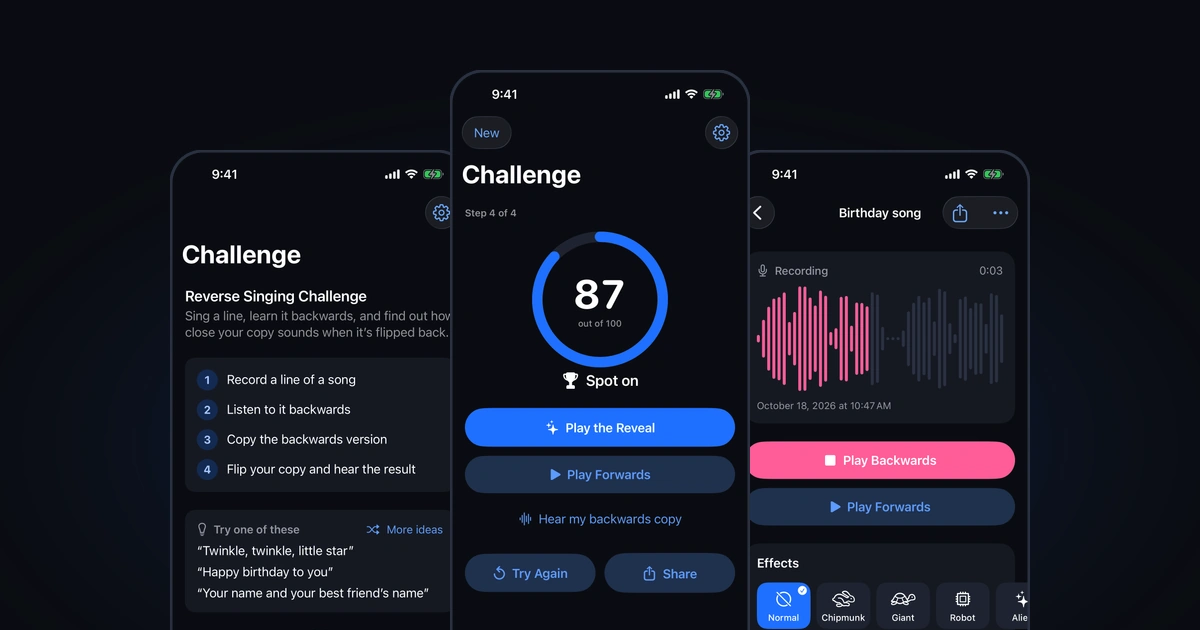
The Reverse Singing Challenge is the Challenge tab in Revoo. It walks you through four steps, shown as Step 1 of 4 to Step 4 of 4 at the top of the screen: record a line, listen to it backwards, copy the backwards version, and flip your copy to hear the result. Each recording stops on its own after 60 seconds, and short lines work best.
Here’s how each step works, what the score means, and how to share the reveal.
Open the Challenge tab, record a short line, play it backwards until you know it, tap Record my copy, then tap Play the Reveal.
Pick a Short Line
Open Challenge, the second tab. Under Try one of these, Revoo suggests three lines at a time, like “Twinkle, twinkle, little star” or “Happy birthday to you”; tap More ideas for the next three, from a list of 15.
Pick something you can say in two or three seconds. A backwards line is hard to remember, so a nursery rhyme, a tongue twister or your own name is a better start than a whole chorus.
Record the Original
Tap the red button labeled Record the original, sing or say your line, then tap stop. Revoo saves the take and reverses it, which takes a moment on longer lines.
If iPhone asks for microphone access, allow it; the challenge can’t record without it. Recording and reversing happen on your phone, and nothing is uploaded.
Learn It Backwards
The Learn it backwards screen has a Play Backwards button. Play it as many times as you like and say it along with the sound: the vowels come out stretched, consonants land in strange places, and an “s” at the end of a word turns into a hiss at the start.
Most people need four or five listens. Breaking the line into chunks of two or three sounds helps more than trying to memorize it in one go.
Record Your Copy
When you’ve got it, tap Record my copy and sing the backwards version, copying the sound as closely as you can. Keep the same speed as the backwards take; rushing is the most common reason the reveal turns to mush.
Tap stop when you finish. Revoo shows Flipping your copy… while it reverses your recording.
Play the Reveal and See Your Score
Tap Play the Reveal to hear your copy played forwards. If your backwards singing was close, your original line comes back, a little warped, in your own voice. Play Forwards plays the original line, and Hear my backwards copy plays the copy you sang.
With Revoo Pro, a ring shows a score out of 100 with a label: Spot on from 85, Really close from 65, Getting there from 40, and Keep practicing below that. The score compares the sound of your flipped copy with the original line, so it’s a party-game number, not a singing grade. Without Pro, the reveal still plays in full; tap See Your Score to see the plans.
Frequently Asked Questions
Is the Reverse Singing Challenge free?
Yes. Recording the original, playing it backwards, recording your copy, hearing the reveal and sharing it as audio or a video are free and unlimited, with no ads. Revoo Pro is an optional subscription that adds the score out of 100, video exports without the Made with Revoo line, voice effects and more.
How is the challenge score worked out?
Revoo compares the sound of your flipped copy with your original recording, on your phone, and turns how closely they match into a number out of 100. It listens to the first 30 seconds. The same line sung well scores high and a different line or noise scores low, but treat it as a party-game number, not a measure of your voice.
Why does my reveal sound like nonsense?
Usually the copy was too fast, too slow, or skipped a sound. Play the backwards take again, say it in short chunks, and match its speed when you record. Endings matter most: a sound at the end of the backwards take becomes the start of the line when it’s flipped, so it’s worth getting right.
Can I do the challenge with a song from my library?
The challenge records the original with your microphone, so you sing or say the line yourself. To hear a song file backwards, import it in the Studio instead: tap Import, choose Audio or Video from Files, and Revoo reverses it like any other take, ready to play both ways.
Say it. Hear it backwards.
Download Revoo, record a word, a song or a laugh, and play it backwards the moment you stop.